Adapter Design Pattern
P
Hi , thanks for stopping by!
I am full-stack developer and I'm passionate about making complex concepts clear through code and visuals. After all, a picture (and a code snippet) is worth a thousand words!
I hope you enjoy my blog.
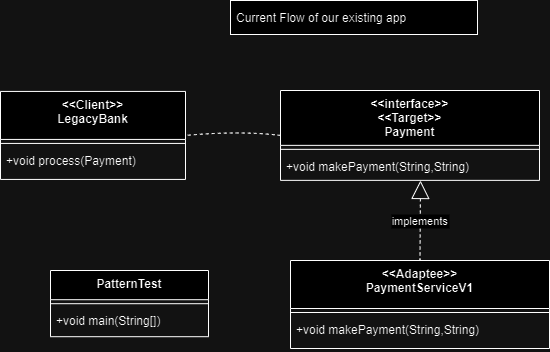
To understand pattern we will first understand the below current flow first .
Current flow
/**
 * LegacyBank (Client)
 */
public class LegacyBank {

    private String data = "xml data";

    public void process(Payment payment) {
        System.out.println("LegacyBank make the payment in xml format");
        payment.makePayment(this.data, "XML");
    }
}


/**
 * Payment(Target).
 */
interface Payment {
    public void makePayment(String data, String type) ;
}

/**
 * PaymentServiceV1 -(Adaptee).
 * only supports xml type .
 */
public class PaymentServiceV1 implements Payment {
    public void makePayment(String data, String type) {
        if ("XML".equalsIgnoreCase(type)) {
            System.out.println("Successfully processed XML payment data ");
        } else {
            System.out.println("Error - Un supported data type - "+ type);
        }

    }
}

public class PatternTest {

    public static void main(String[] args) throws Exception {
        LegacyBank bank = new LegacyBank();
        bank.process(new PaymentServiceV1());

    }

}
// output
LegacyBank make the payment in xml format
Successfully processed XML payment data
Now the PaymentServiceV1(ThirdParty) updated to next version in this version instead of xml they accept only json data .
/**
 * PaymentServiceV2
 */
public class PaymentServiceV2{
    public void makeJSONPayment(String data, String type)  {
        if ("JSON".equalsIgnoreCase(type)) {
            System.out.println("Processing json payment Data ");
        } else {
            System.out.println("Error - Un supported data type - "+ type);
        }
    }
}
Now we need to support the new version (PaymentServiceV2) without changing the Target(Payment) and client(LegacyBank ) code .
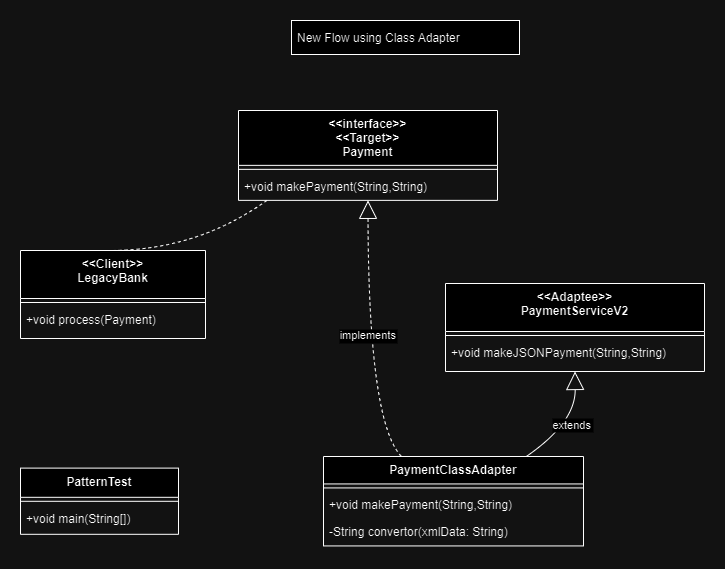
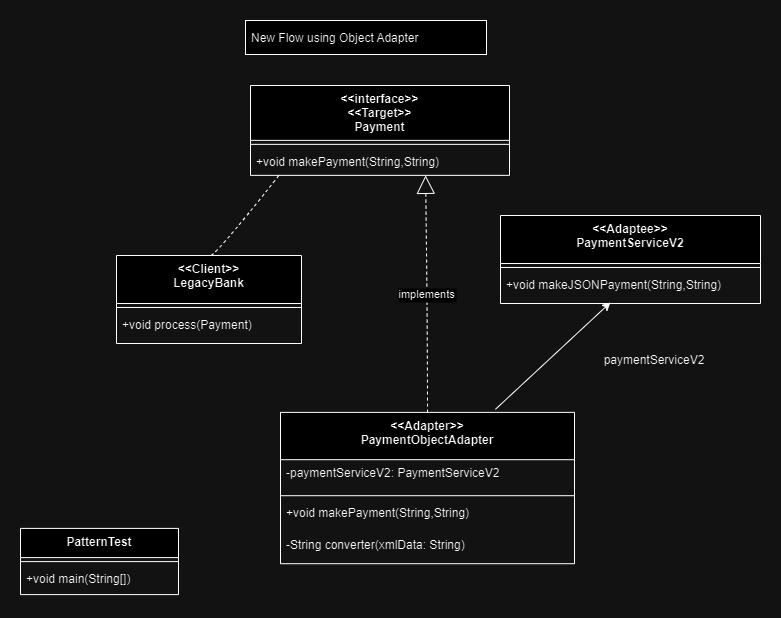
We are going to use Adapter Pattern to fix this issue . Adapter Pattern has two type
Adapter Class
Adapter Object
1 . Adapter - Class
/**
 * Payment (Class - Adapter)
 */
public class PaymentClassAdapter extends PaymentServiceV2 implements Payment {

    public void makePayment(String data, String type) {
        // Call existing process method to handle payment and potentially legacy data
        String jsonData = data;
        if ("XML".equalsIgnoreCase(type)) {
            jsonData = converter(data);
        }

        // Call latest version
        super.makeJSONPayment(jsonData, "JSON");

    }

    /**
     *  data xml to json
     *  */
    private String converter(String xmlData) {
        String jsonData = xmlData;
        return jsonData;
    }
}


public class PatternTest {

    public static void main(String[] args) throws Exception {
        LegacyBank bank = new LegacyBank();
        bank.process(new PaymentClassAdapter());
    }
}

// output
LegacyBank make the payment in xml format
Processing json payment Data // Our ClassAdapter process successfully
2 . Adapter - Object
/**
 * Payment (Object - Adapter)
 */
public class PaymentObjectAdapter implements Payment {

    private PaymentServiceV2 paymentServiceV2 = new PaymentServiceV2();

    public void makePayment(String data, String type)  {
        // Call existing process method to handle payment and potentially legacy data
        String jsonData = data;
        if ("XML".equalsIgnoreCase(type)) {
            jsonData = converter(data);
        }

        // Call latest version
        paymentServiceV2.makeJSONPayment(jsonData, "JSON");

    }

    /**
     *  data xml to json
     *  */
    private String converter(String xmlData) {
        String jsonData = xmlData;
        return jsonData;
    }

}

public class PatternTest {

    public static void main(String[] args) throws Exception {
        LegacyBank bank = new LegacyBank();
        bank.process(new PaymentObjectAdapter());
    }
}

// output

LegacyBank make the payment in xml format
Processing json payment Data // Our ObjectAdapter process successfully